.png)
Context
About Art ImmHERsive
In honor of International Women's Day, my team and I collaborated with Austin Public Library to design an educational AR game.
This project was inspired by my literature background and experience teaching World Literature at UT Austin. Working with students who preferred digital media, I asked: How can AR games reshape how people engage with global mythology and folklore?
This led to a semester-long effort aligning an AR game and 3D space with user preferences for interactive experiences.
Problem
Problem statement
How might we create an intuitive AR experience that enhances learning and engagement with diverse folklore?
Process
Project roadmap
The project required integrating three workflows: user research, application and content design, and design of the 3D space. I used Agile to help our team build, test, and refine each layer iteratively.
.png)
Phase 1
Generative research
Competitive research: what works and what doesn't?
I conducted competitor analysis to map strengths, gaps, and opportunities across immersive exhibits.
Consider
Cultural exposure, accessible design, predictable timing, learning tokens, responsive sensors
Avoid
Poor wayfinding, limited seating, stationary formats, required VR gear, missing cultural context
Opportunities
Clear information architecture, flexible pacing, inclusive spaces, equipment-free interaction, cultural celebration
Art ImmHERsive's emphasis on cultural education was a core differentiator that could make it memorable and deepen community engagement.

Screener survey: who visits immersive experiences?
The screener revealed visitors span a wide range of ages and backgrounds. Three primary user groups emerged: young professionals, parents with children, and older adults. Given our 10-week timeline, we focused on young professionals and parents with children.


In-depth interviews (n=9)
I conducted nine interviews with participants across age and life stage. Four findings shaped the design direction:
Takeaway 1
Print over digital wayfinding
Readable print cues worked better than digital maps. We paired print materials with a phone map for tracing and checking off routes.
Takeaway 2
Audio on demand, not on a loop
Alternate text and audio stations under 15 minutes. Remove waits and let visitors skip any segment.
Takeaway 3
Sensory pull for younger users
Younger visitors valued spectacle and interaction. Parents prioritized age-appropriate content that sustained attention.
Takeaway 4
Freedom over rigid flow
Seven participants enjoyed exploring freely when navigation was clear and essentials were easy to find.
User profiles
The screener and interview findings consolidated into clear pain points and needs across our two priority groups, which directly informed downstream design decisions.


User journeys
By mapping each persona's journey through the exhibit, we could see where physical space, the application, and interpersonal interactions intersected, helping us design intentionally for those touchpoints.


Brand
Brand identity
Content & visuals
My conception of Art ImmHERsive was inspired by stories of strong women from across the world. I started with A Thousand and One Nights, short stories that span South Asia, China, and the Middle East, precisely because of how it has been misunderstood in popular culture.
The visual language drew from a spectrum of art traditions: modernist and abstract art, line art, miniatures, geometric patterns, and Mughal architecture. The color palette honors the rich jewel tones of South Asian and Middle Eastern art and architecture.
.png)
Moodboards
Because the project was so visually driven, brand exploration was non-negotiable. I compiled themes, color palettes, and reference visuals across four directions: futurism, minimalism, historical, and children's storybooks.


Physical space
For the physical space, I researched South Asian and Middle Eastern architecture to ground the aesthetic in cultural authenticity. My team calculated foot traffic at the Austin Public Library and sketched rooms with various information layouts. These sketches were then translated into AutoCAD renderings.
.png)
Phase 2
Mobile app ideation
Sketches and wireframes
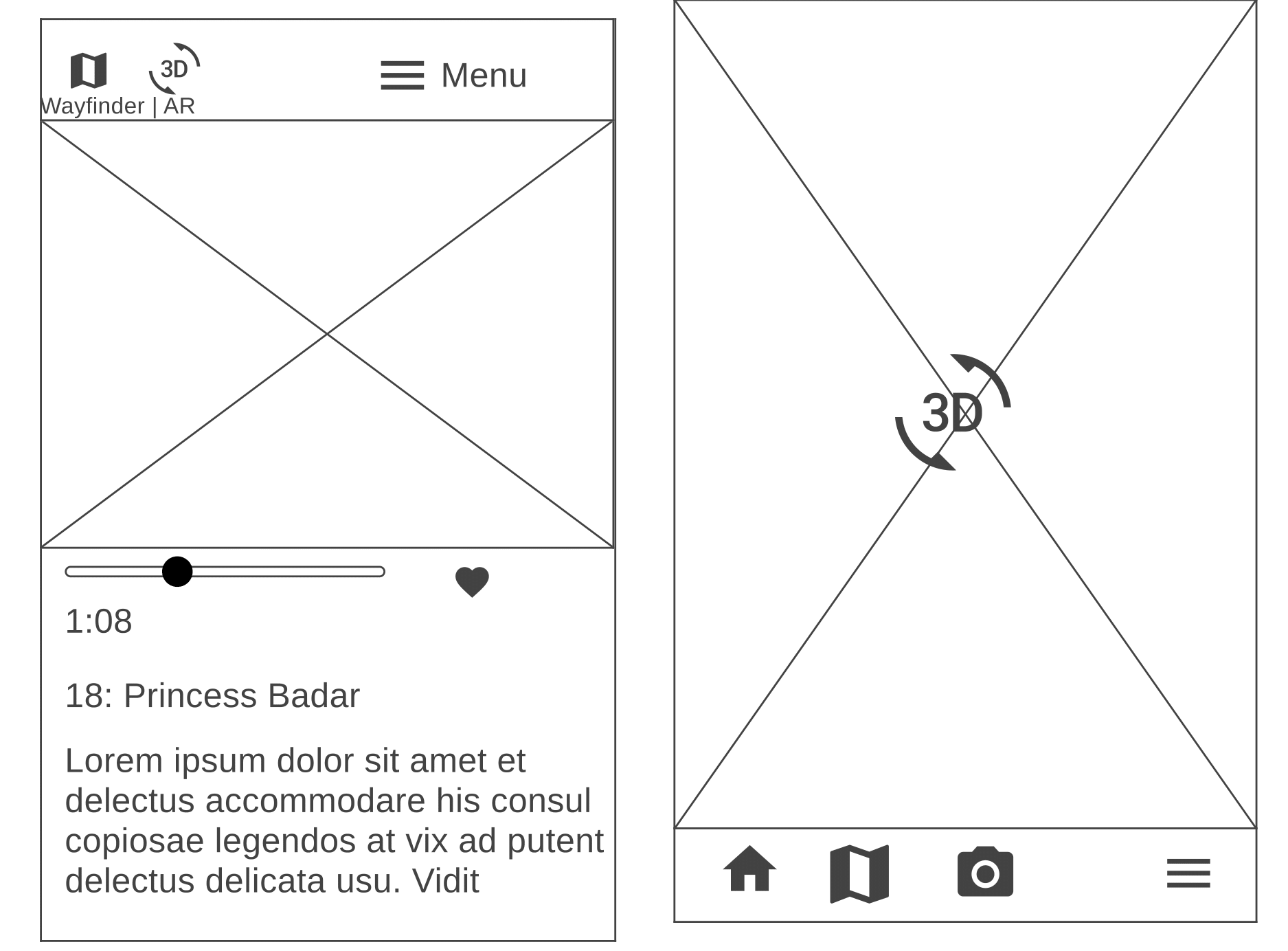
We started with a Crazy 8s exercise as a team to align on key features: learning about the exhibit, reserving tickets, accessing audio guides, using the AR camera, scanning QR codes, navigating with a wayfinder, and saving favorite items.
.png)
My guiding principle while sketching: give users quick, easy access to features without distracting from the immersive experience itself. This led to a bottom navigation bar with icons for the most-used features.

.png)
Lo-fi
Prototyping & usability testing
Information architecture
I mapped our information architecture to make sure every flow held together end-to-end. Proposed key task flows included:
- Discover: Learn about the production house, find local exhibits, and book tickets.
- Navigate: Access the map and scan exhibit QR codes.
- Experience: Play audio guides and learn how the AR game works.
- Collect: Reveal story items with the AR camera, save tokens, and view the collection.

.gif)
Lo-fi usability testing
To pressure-test the layered information architecture, we ran short tasks to see whether users could navigate the main flows without friction:
Task 1: Find the One Thousand and One Nights event you've scheduled.
Task 2: Listen to the audio version of Chapter 1.
Task 3: Collect the gold lamp's AR token.
Method: Lo-fi, hand-drawn sketches transposed into Figma screens, tested through moderated think-aloud sessions in person and on Zoom.
Participant demographics
Five young professionals, graduate students, and older adults.
Lo-fi findings & recommendations
Takeaway 1
Nomenclature
Labels such as Art, Explore, and My Library were unclear. We replaced them with names that better predicted the content.
Takeaway 2
Navigability
Users could not locate Princess Badr across overlapping menu categories. We simplified and reordered the navigation.
Takeaway 3
Core functionality
The app's purpose was unclear. We reduced booking and reading features to focus on context and the AR game.
Hi-fi
High-fidelity prototyping & testing
Hi-fi prototyping
We simplified the information architecture for the hi-fi to surface key flows more clearly. I overhauled the app's navigability, added micro-interactions, and implemented a design system.
Hi-fi mobile prototype walkthrough
Hi-fi usability testing
For the final round, I used the Wizard of Oz technique to simulate the 1,001 Nights exhibit, using themed décor, paintings, and signage set up in the physical space. Then I ran usability sessions with 7 participants.
Tasks tested
Task 1: Open the app, create an account, then check whether your friend or child could enter the physical space in a wheelchair.
Task 2: Find the 1,001 Nights collection, locate Exhibit 1: The Story of Princess Badr, and save it.
Task 3: Look up Princess Badr's relationship to 1,001 Nights.
Task 4: Scan the QR code, navigate to Chapter 4's audio guide, and favorite it.
Task 5: Find out how to play the AR game for this exhibit.
Task 6: Start the AR game, open the camera to see what the magic keys reveal, save the token, and view your collection.
Method: A hi-fi Figma prototype tested through six moderated think-aloud sessions on Zoom.
Participant demographics
Seven participants across careers, ages 14 to 67.
Hi-fi findings & recommendations
Takeaway 1
Information architecture
Accessibility information and audio guides were buried inside the broader app. We brought exhibit-level information forward.
Takeaway 2
Comprehension
Users missed how Princess Badr connected to One Thousand and One Nights. We clarified the story hierarchy and context.
Takeaway 3
AR game
Capturing AR tokens caused friction. Feedback also identified ways to strengthen rewards and motivation.
Hi-fi SUS results
After testing, I administered a System Usability Scale questionnaire to quantify the experience.
.png)
Implementation
The AR game & immersive exhibit
You can play my AR game by clicking the prototype below, and watch my team's rendition of A Thousand and One Arabian Nights in the embedded video.
.png)
Reflection
What I learned
Takeaway 1
Accessibility
Integrating exhibit and app design requires consistent attention to accessibility and sensory load.
Takeaway 2
Navigability
Information architecture must work across content, physical space, and app design.
Takeaway 3
Cultural context
Cultural grounding should honor diverse stories without creating information overload.